 1st JMSB
QV/04.02Guide
TAC//MSG: messages and reports
How to read the net, send a message, file a report and work a task - all from the map.
G1GuideThe reader
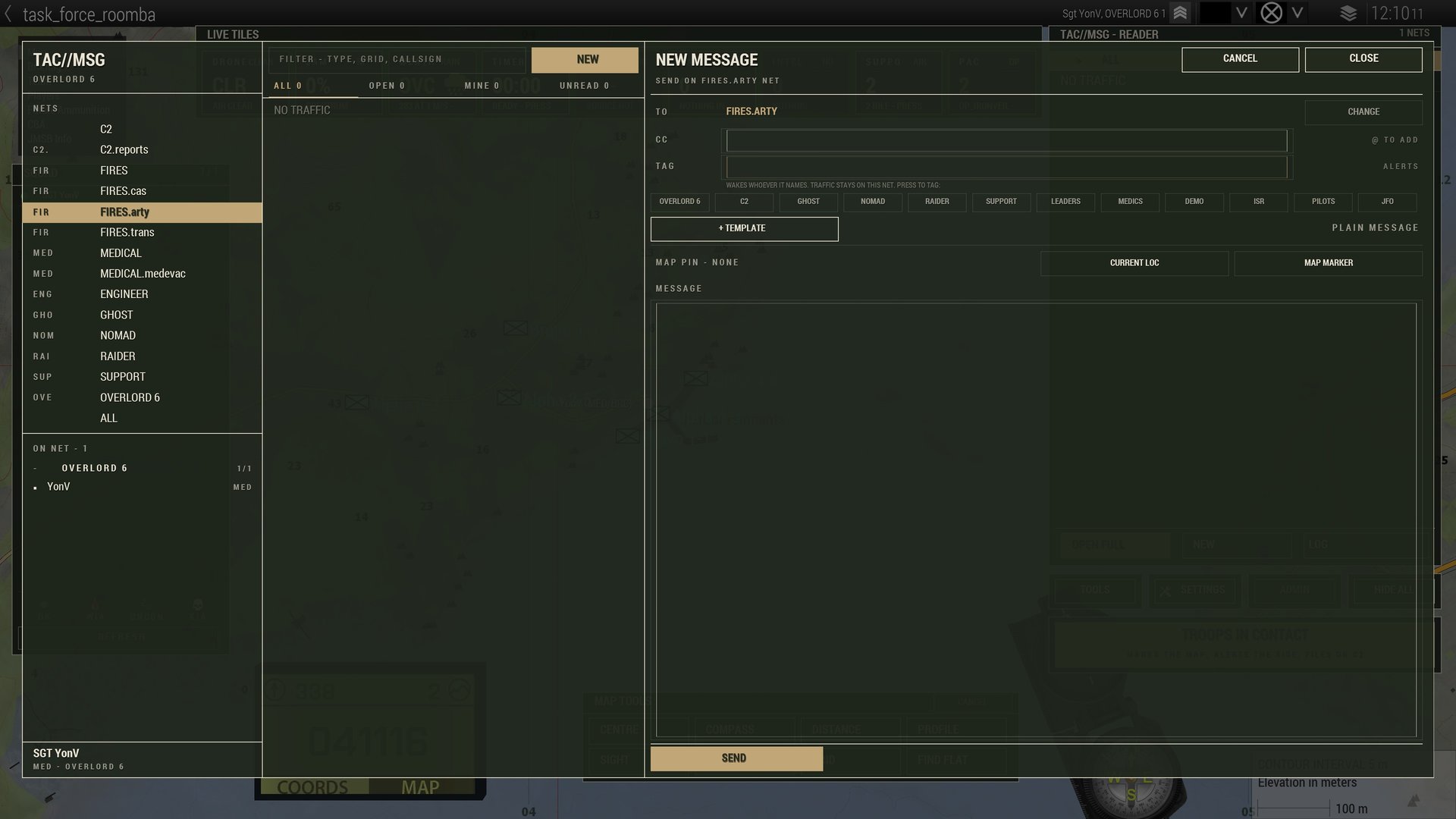
The docked reader sits on the map: net tabs across the top (ALL, your squad, every net with traffic), threads newest first, FLASH and PRIORITY first in the eye. Open a thread in the rail; < BACK returns. OPEN FULL gives you the whole screen, NEW starts a message, LOG is the history of what has alerted you - entries with a grid centre the map when pressed.
G2GuideSending a message
- Press NEW.
- Choose where it goes: SEND TO a man or a squad, or SEND ON a net; everyone else goes on the CC line.
- Optional TAG: call signs, squads or jobs to wake - LEADERS, MEDICS, EOD, ISR, PILOTS, JFO. Traffic stays on the net; the tag only wakes who it names.
- Press + TEMPLATE for a report card, or write plain text (it goes as a MESSAGE).
- Fill the card. REQ marks what must be filled. A grid field takes CURRENT LOC, a MAP MARKER, or what you type. Status fields are GREEN / YELLOW / AMBER / RED / BLACK.
- Optional MAP PIN.
- Press SEND, or SEND - FLASH when it cannot wait. A refusal is written next to the button.
G3GuideIn a thread
- QUICK REPLY buttons - roger, wilco, WAIT ONE, SMOKE OUT, LZ SECURE, NEGATIVE - set yours under Settings.
- + GRID drops your grid in; + MARKER sends a marker's name and grid in one press.
- ACK sends a roger. PIN TO MAP puts the thread's grid on your map. NOTIFY cycles NET / FOLLOWING / MUTED for that thread.
G4GuideTasks
Some reports open a task: CASEVAC, call for fire, CAS, HLZ, airdrop, QRF. A task moves by what is sent into it:
- ROGER - received.
- WILCO - the one who will do it has taken it.
- ON TASK - in progress.
- CANTCO with a reason - declined.
- CLOSE THREAD with the outcome - only whoever opened it can close it.
G5GuideJamming
Inside a jamming field the reader says LINK DEGRADED (sends go late) or LINK NONET (sends are refused). You always receive.
[PICTURE: a thread open with the quick replies showing]